There are many reasons to reinstall hyperion prducts when you get with a trouble.
The steps:
1. Stop all of hyperion services
2. Run uninstall Hyperion
3. Delete the Hyperion registries, this is very important, you cannot just simple run reinstall without clear the Hyperion registries.
regedit -> delete all of the entries inside Hyperion Solution, and other 2 hyperion items below Oracle
4. Delete all of the related Hyperion Environment Variables by right click Computer. For the path variable, you can edit it and delete all hyperion related entries, but don;t delete the entries for other applications.
5. Then you can go ahead to reinstall.
Have a fun!
5/12/10
install Hyperion 11.1.2 in Windows 2008
The steps of Install Hyperion 11.1.2 in Windows 2008 64bit:
1. Install the IIS service in windows OS
2. Install Oracle database(or other database), select shared mode instead of dedicated mode. By default, the dedicated mode will allow 150 process thread simultaneously, and you is not enough for Hyperion services.
Create an Oracle user name for the installation.
3. For Oracle, you just need to create one database instance, no need to create many databases, but you can create many user schemas. In a word, Oracle, one database,multi user schemas.
4. For SQL database, you can create many databases but one user id. In a word, SQL, one user id, multi databases.
5. Download Hyperion 64 bit software, extracted them in one folder
6. For the previous version Hyperion 11.1.1.3, you may install weblogic before install Hyperion products. And in Hyperion 11.1.1.3, weblogic 64bit has to be configured manully. In Hyperion 11.1.1.3, you may use weblogic 32bit on 64bit windows machine.
7. For the new Hyperion 11.1.2 version, no need to install weblogic before install hyperion, because weblogic has become a part of foundation services, and it will be installed by default.
8. Run as administrator to the install hyperion, after installation, no need to reboot computer
9. After installation go to configure shared service first, after it is successful,then confirgure all of others.

4/12/10
Start remote Hyperion in sequence
REM Remote Start Hyperion Service
REM Description: for remote service, use
REM sc \\machine start
@ECHO OFF
REM -------STARTING Hyperion Services----------------------------
REM -------HyperionRMIRegistry--------------------------------------
sc \\machine start "Hyperion RMI Registry"
waitfor NONEXISTINGSIGNAL /T 5
REM -------Hyperion OpenLDAP--------------------------------------
sc \\machine start "Hyperion Foundation OpenLDAP"
waitfor NONEXISTINGSIGNAL /T 5
REM -------Hyperion Shared Services Web application-----------------
sc \\machine start HyS9SharedServices
waitfor NONEXISTINGSIGNAL /T 30
REM ------starting Essbase Server ----------
sc \\machine start "Hyperion Essbase Services 11.1.1 - hypservice_1"
waitfor NONEXISTINGSIGNAL /T 5
REM ------starting Essbase ADM ----------
sc \\machine start "Hyperion Administration Services - Web Application"
waitfor NONEXISTINGSIGNAL /T 5
REM --------starting integration -------
sc \\machine start "Hyperion Integration Services"
waitfor NONEXISTINGSIGNAL /T 5
REM -------Hyperion Provider Services Web application----------------
sc \\machine start HyS9aps
waitfor NONEXISTINGSIGNAL /T 5
REM --------starting workspace-----------------
sc \\machine start "Hyperion Workspace - Web Application"
waitfor NONEXISTINGSIGNAL /T 5
sc \\machine start "Hyperion Workspace - Agent Service"
waitfor NONEXISTINGSIGNAL /T 5
sc \\machine start "Hyperion Annotation Server"
waitfor NONEXISTINGSIGNAL /T 5
REM -------------starting Planning-------
sc \\machine start "Hyperion Planning - Web Application"
waitfor NONEXISTINGSIGNAL /T 10
REM --------starting EPMA Core Services-------------
REM ---the next 4 services will be started by Process manager automatically---
REM Hyperion EPM Architect - .Net JNI Bridge
REM Hyperion EPM Architect - Engine Manager
REM Hyperion EPM Architect - Event Manager
REM Hyperion EPM Architect - Job Manager
sc \\machine start "Hyperion EPM Architect - Process Manager"
waitfor NONEXISTINGSIGNAL /T 60
REM --------starting EPMA Architect-------------
sc \\machine start "Hyperion EPM Architect - Web Application"
REM waitfor NONEXISTINGSIGNAL /T 10
sc \\machine start "Hyperion EPM Architect Data Synchronization - Web Application"
REM waitfor NONEXISTINGSIGNAL /T 10
sc \\machine start "Hyperion CALC Manager - Web Application"
REM waitfor NONEXISTINGSIGNAL /T 10
REM -------Hyperion Financial Reporting Java RMI Registry------------------
sc \\machine start HyS9FRRMI
waitfor NONEXISTINGSIGNAL /T 2
REM -------Hyperion Financial Reporting Print Server----------------------------
sc \\machine start HyS9FRPrint
waitfor NONEXISTINGSIGNAL /T 2
REM -------Hyperion Financial Reporting Report Server---------------------------
sc \\machine start HyS9FRReport
waitfor NONEXISTINGSIGNAL /T 2
REM -------Hyperion Financial Reporting Scheduler Server------------------------
sc \\machine start HyS9FRSched
waitfor NONEXISTINGSIGNAL /T 2
REM -------Hyperion Financial Reporting Web application-------------------------
sc \\machine start HyS9FRWeb
waitfor NONEXISTINGSIGNAL /T 5
REM -------starting web analysis ------------------
sc \\machine start "Hyperion Web Analysis - Web Application"
REM waitfor NONEXISTINGSIGNAL /T 5
REM -------Hyperion Workspace Web application(Weblogic is included already---------------------------
REM -------The registry path refers this service to start weblogic -------------------
sc \\machine start HyS9Workspace
waitfor NONEXISTINGSIGNAL /T 20
REM ALL DONE!
waitfor NONEXISTINGSIGNAL /T 30
4/3/10
Cannot start essmsh?
essmsh cannot be started from command line, if this happens, do the next steps:
1.
set path = C:\Hyperion\products\Essbase\EssbaseClient\bin
2. Add C:\Hyperion\products\Essbase\EssbaseClient\bin to the Path environment variable as follows
 3. Restart computer
1.
set path = C:\Hyperion\products\Essbase\EssbaseClient\bin
2. Add C:\Hyperion\products\Essbase\EssbaseClient\bin to the Path environment variable as follows

3/30/10
ODI configuration with SQL 2005 server
1. Download Oracle Data Indicator Software from http://edelivery.oracle.com/
2. Check the Windows system, to see if it is 64 bit or 32 bit.
3. Download Java JDK 1.6 the Java JDK is installed C:\Program Files\Java\jdk1.6.0_18
4. Java Environment Variable setting, set ODI_JAVA_HOME = C:\Program Files\Java\jdk1.6.0_18

5. Install the ODI software in Windows system
6. Download Java JDBC driver for SQL Server, sqljdbc_2.0.1803.100_enu.exe, extract it and copy the files to C:\OraHome_1\oracledi\drivers folder
7. Delete the sqljdbc.jar but keep the sqljdbc4.jar file, because the sqljdbc4.jar is the correct driver file for ODI SQL JDBC linksqljdbc4.jar and sqljdbc.jar.
Note:
For JDK5 – use sqljdbc.jar
for JDK6 – use sqljdbc4.jar
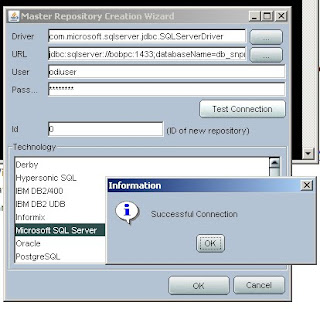
8. Create ODI Master Repository using Repository Management
2. Check the Windows system, to see if it is 64 bit or 32 bit.
3. Download Java JDK 1.6 the Java JDK is installed C:\Program Files\Java\jdk1.6.0_18
4. Java Environment Variable setting, set ODI_JAVA_HOME = C:\Program Files\Java\jdk1.6.0_18

5. Install the ODI software in Windows system
6. Download Java JDBC driver for SQL Server, sqljdbc_2.0.1803.100_enu.exe, extract it and copy the files to C:\OraHome_1\oracledi\drivers folder
7. Delete the sqljdbc.jar but keep the sqljdbc4.jar file, because the sqljdbc4.jar is the correct driver file for ODI SQL JDBC linksqljdbc4.jar and sqljdbc.jar.
Note:
For JDK5 – use sqljdbc.jar
for JDK6 – use sqljdbc4.jar
8. Create ODI Master Repository using Repository Management

3/18/10
SQL Server file system backup and recovery method
1. ntbackup command to backup the SQL file system
2. reg command to backup the windows registry
Important: when we recover file system from file system backup, first DELETE the files that have been damaged or maybe damaged, otherwise, the existing file will NOT be recoverred from the backup, this is very important!
Example: Suppose, the SQL Master database is damaged, and the SQL server cannot be started. Here is the steps: Open the C:\Program Files\Microsoft SQL Server\MSSQL.1\MSSQL\Data folder, for all of the files that have new time stamps after the existing backup time, move them to a temp folder, or simply delete all of the files in C:\Program Files\Microsoft SQL Server\MSSQL.1\MSSQL\Data folder. This will force a clean recovery. And then,use ntbackup command line to recover the C:\Program Files\Microsoft SQL Server\MSSQL.1\MSSQL\Data folder from the backup.
-----------
Below is the script for backup the SQL file systems:
@ECHO OFF
REM --------------------------------------------------------------------------------
REM Procedure Name: BackupSQLFileSystem.bat
REM Created By: Bob Wang
REM Creation Date: 17-Mar-2010
REM Functionality: 1. backup SQL File System
REM 2. backup hKEY_LOCAL_MACHINE registries
REM
REM Modification History:
REM ---------------------------------------------------------------------------------
@for /f "Tokens=1-4 Delims=/ " %%i in ('date /t') do @set dt=%%i-%%j-%%k-%%l
@for /f "Tokens=1" %%i in ('time /t') do @set tm=-%%i
@set tm=%tm::=-%
@set dtt=%dt%%tm%
@echo SQL file system full backup set: %dtt%.
@echo Please wait...
@C:\WINDOWS\system32\ntbackup.exe backup "@C:\download\GoLive\SQL Server\set_SQL.bks" /a /d "Backup %dtt%" /v:no /r:no /rs:no /hc:off /m copy /j "%dtt%" /l:s /f "C:\SQL Server Backup\SQLFileSystemBackup %dtt%.bkf"
@ECHO eXPORT HKEY_LOCAL_MACHINE registries ..
@C:\WINDOWS\system32\REG.exe EXPORT HKLM "C:\SQL Server Backup\HKEY_LOCAL_MACHINE_Backup %dtt%.reg"
-----------------------------
The improved code:
@ECHO OFF
REM --------------------------------------------------------------------------------
REM Procedure Name: BackupSQLFileSystem.bat
REM Created By: Bob Wang
REM Creation Date: 17-Mar-2010
REM Functionality: 1. backup SQL File System
REM 2. backup hKEY_LOCAL_MACHINE registries
REM
REM Modification History:
REM ---------------------------------------------------------------------------------
@set path1="C:\WINDOWS\system32\ntbackup.exe"
@set path2="@C:\download\GoLive\SQL Server\set_SQL.bks"
@set path3="C:\SQL Server Backup\SQLFileSystemBackup %dtt%.bkf"
@set path4="C:\SQL Server Backup\HKEY_LOCAL_MACHINE_Backup %dtt%.reg"
@for /f "Tokens=1-4 Delims=/ " %%i in ('date /t') do @set dt=%%i-%%j-%%k-%%l
@for /f "Tokens=1" %%i in ('time /t') do @set tm=-%%i
@set tm=%tm::=-%
@set dtt=%dt%%tm%
@echo SQL file system full backup set: %dtt%.
@echo Please wait...
@%path1% backup %path2% /a /d "Backup %dtt%" /v:no /r:no /rs:no /hc:off /m copy /j "%dtt%" /l:s /f %path3%
@ECHO eXPORT HKEY_LOCAL_MACHINE registries ..
@C:\WINDOWS\system32\REG.exe EXPORT HKLM %path4%
SQL backup Script
DECLARE @name VARCHAR(50) -- database name
DECLARE @path VARCHAR(256) -- path for backup files
DECLARE @fileName VARCHAR(256) -- filename for backup
DECLARE @fileDate VARCHAR(20) -- used for file name
SET @path = 'C:\Backup\'
SELECT @fileDate = CONVERT(VARCHAR(20),GETDATE(),112)
DECLARE db_cursor CURSOR FOR
SELECT name
FROM master.dbo.sysdatabases
WHERE name NOT IN ('master','model','msdb','tempdb')
OPEN db_cursor
FETCH NEXT FROM db_cursor INTO @name
WHILE @@FETCH_STATUS = 0
BEGIN
SET @fileName = @path + @name + '_' + @fileDate + '.BAK'
BACKUP DATABASE @name TO DISK = @fileName
FETCH NEXT FROM db_cursor INTO @name
END
CLOSE db_cursor
DEALLOCATE db_cursor
3/16/10
Map IP address to Host Name
You can ping the server IP address, but cannot ping the host name of the server.
Solution: add record in the client host file. The host file is located at \windows\system32\drivers\etc\*
----------------
Detail:
You are having a Name Resolution issue. The internet uses a DNS service to
map names to ip-addresses. However, those are Public ip-addresses, not private
Lan addresses. To solve this Windows uses multiple techniques:
a Master Browser to record systems
the host file
If you have dependable ip-addresses (ie: static addresses or MAC enforced ip assignments),
then you can enter the mapping into your host file (this is the technique I use).
The host file is located at \windows\system32\drivers\etc\* and the format of the entry is
ip-address (one or more spaces) theSystemName
The host file allows any system to be included, private (eg your desktop) and public
(eg www.google.com) -- but make sure you get the ip-address correct!
Apachy Web Server Plug-in folder
In the process of configuration, the environment is: SQL 2005, Windows 2003, the installed component is: Weblogic 9.2, EPMA, Essbase, Planning, SmartView. when I configure the web server, I select Apachy, and the next screen ask for the web server plug in folder, "Enter the directory where the plug-ins(mod_wl_20.so) are installed".
There are 2 ways to find the directory:
Way One:
1. Download and apply the web server plug-in patch #7825156 from OracleMetaLink as per the instructions below:
• Select the Patches and Updates tab after logging in to OracleMetaLink.
• Click Simple Search.
• In the Search By field, select Patch Number from the list.
• Enter the patch number. The patch number may be different for different product releases and platforms.
• Select the platform (or choose generic as applicable)
• Click Go.
• Click Download to download the patch.
Way Two:
When installed weblogic, select custom install and select "web server plugins", this will install the files you need in the BEA installation.
3/11/10
Hyperion - Windows Backup List
File System Backup:
Regular file system backups are recommended for these EPM System products:
. Shared Services (cold backup)
. Dashboard Development Services
. Oracle Hyperion EPM Architect, Fusion Edition
. Oracle Hyperion Performance Scorecard, Fusion Edition
. Planning
. Reporting and Analysis
File system items that are commonly backed up:
. Hyperion home directory (to back up all installed products), especially these subdirectories:
. HYPERION_HOME/common/config/9.5.0.0 (to back up the configuration and reconfiguration settings written to the Shared Services Registry)
. For Oracle Enterprise Performance Management Workspace, Fusion Editionmodules,
. EPM Workspace search index files in HYPERION_HOME/common/config/9.5.0.0/wsearch
. HYPERION_HOME/products/specific_product
. HYPERION_HOME/deployments (EPM System Web application deployment subdirectory)
Note: This item applies only to products that require a Web application server.
. Product applications and application data
. In Windows environments:
. Windows registry: HKEY_LOCAL_MACHINE and all of its subkeys
. Windows Environment Varables
----------
Database Backup
l Databases that store EPM System application data
l Shared Services databases:
m Relational database for Shared Services
This database contains Shared Services Registry, which stores most product
configuration settings.
See “Backing Up the Shared Services Relational Database ” on page 17.
m OpenLDAP database, if OpenLDAP is used as the Shared Services Native Directory
m Oracle Internet Directory database if Oracle Internet Directory is used as the Shared
Services Native Directory
See the Oracle Internet Directory documentation (http://download.oracle.com/docs/
cd/B28196_01/idmanage.1014/b15991.pdf).
Preparing These backups are recommended:
m Physical full backup immediately after installation and configuration
m Weekly cold backup with complete backup of files under HYPERION_HOME/
products/Foundation/openLDAP
m Daily hot backups of transaction logs after OpenLDAP checkpoints are run
The transactions logs are in HYPERION_HOME/products/Foundation/openLDAP/
var/openldap-data/log.000000000x. A backup copies the logs to the logfiles
(Windows) or LogFiles (UNIX) subfolder of the backup folder. Examples: (UNIX)
o Windows—Running backup.bat c:/temp/bck copies the logs to c:/temp/
bck/logfiles/log.000000000x.
o UNIX—Running backup.sh c:/temp/bck copies the logs to c:/temp/bck/
LogFiles/log.000000000x.
Windows:Export registries using command line
c:\reg export HKLM\Software\7-zip c:\7-zip.reg
This will export the below key for 7-zip:

This will export the below key for 7-zip:

Windows: stop and start services from the command line
net stop
net start
A full list of the exact services is found in the registry (run regedit.exe) under the HKEY_LOCAL_MACHINE\SYSTEM\CurrentControlSet\Services key.
Alternatively, you can perform the stop and start using the name that is showed in the Services Control Panel applet by putting the name in quotes, i.e.
net stop ""
net start ""
net start
A full list of the exact services is found in the registry (run regedit.exe) under the HKEY_LOCAL_MACHINE\SYSTEM\CurrentControlSet\Services key.
Alternatively, you can perform the stop and start using the name that is showed in the Services Control Panel applet by putting the name in quotes, i.e.
net stop "
net start "
3/10/10
The powerful NTbackup command line
For Hyperion, we need to make complete cold backup for many important folders, for windows system, the ntbackup command give us a simple but powerful way to make a backup.
-----------------------
A sample NTbackup script, with the current date/time in the filename and backup label:
If you ever tried to automate NTbackup, you probably got it up and running, scheduled every day or week, but then noticed over time that the date and time labels that go on the backup file are the current date/time of when you created the backup set. This useful shell script provides a more intelligent solution by parsing the current date and time and inserting them into the filename and backup label. This makes the backups much easier to identify in the case where you need to restore some files.
The script below makes a full backup (not differential) of the files specified in the backup set.bks. To get the set.bks, in command line, input ntbackup, press enter key, and select backup wizard, make a select as below and saved the file as set.bks.

It doesn't verify the backup, and lastly it sends a copy of the backup file to another computer (just in case), that's what the last 3 lines are for. You can obviously remove this step if you don't want it.
@for /f "Tokens=1-4 Delims=/ " %%i in ('date /t') do @set dt=%%i-%%j-%%k-%%l
@for /f "Tokens=1" %%i in ('time /t') do @set tm=-%%i
@set tm=%tm::=-%
@set dtt=%dt%%tm%
@echo Copying backup set: %dtt%.
@echo Please wait...
@C:\WINDOWS\system32\ntbackup.exe backup "@C:\Documents and Settings\bob\Local Settings\Application Data\Microsoft\Windows NT\NTBackup\data\set.bks" /a /d "Backup %dtt%" /v:no /r:no /rs:no /hc:off /m copy /j "%dtt%" /l:s /f "C:\test\Backup %dtt%.bkf"
@echo Sending backup file to Server2. Please wait...
@echo not used this time: @xcopy "@G:\Auto Backups\Backup %dtt%.bkf" "@\\Server2\Backup_Copy" /Y
3/4/10
EPMA compare to Classic Planning
The comparison between EPMA and Classic Planning method:
1) The architecture difference between EPMA and Classic:
For Classic Planning applications, databases are created and maintained within Planning. For Performance Management Architect applications, applications are created in Performance Management Architect and deployed to Planning.
2). The advantages of EPMA over Classic in the next case:
If there are many application and we want to centrally develop everything, EPMA is bettter. Besides, EPMA application can use the existing dimensions and template, and easier to develop a new application, the dimension library makes the dimension reusable. EPMA is easier to manage hierarchies through an advanced gui compared to classic, we can share dimensions across not just planning applications but HFM.
3). The great difference in data loading performance
For classic planning, we can use ODI and outline loader for data transferring. The outline loader and ODI utility uses much of the core engine, the data loading is very fast. ODI does not work directly with EPMA and the current adaptors are aimed at classic planning. EPMA may improve over time but now it is not efficient for data loading and very slow. For example, to load a dimension with about 1000 members, EMPA may use 1-3 hours while outline loader and ODI may just use 10 mins only.
4). Calculation Manager and Business Rule Module:
Calculation Manager can only works with EPMA in the olde Hyperion versions, and that used to be a reason to select EPMA. Calculation Manager is more convenient in building the business rules than the business rule module. In version 11.1.1.3, hyperion product is improved, and classic planning can also use Calculation Manager as an important method to create the business rule.
5. The compatibility with ODI:
ODI does not work directly with EPMA and the current adaptors are aimed at classic planning. We can transfer data with ODI to Essbase(the Essbase have the Planning Data) directly using Essbase Adaptor, and don't have to use planning adaptor.
6. Shared Service:
EPMA and classic planning both works with Shared Service.
7. Migration From Classic to EPMA is simple:
It is simple to migrate from classic planning to EPMA planning, there is existing method to migrate Classic Planning Application to EPMA. This give us a choice for the future, because the hyperion product is in improvement, the current defects for EPMA may be solved in the later versions. And the client company may also have a business reason to use EPMA in the future.
2/28/10
Installing EPM System Products in a Distributed Environment
You typically install EPM System products in a distributed environment. The number of computers you need depends on several factors, including:
l The size of the applications
l The number of users
l The frequency of concurrent use by multiple users
l Any requirements your organization has for high availability
l Your organization's security requirements
EPM System Installer simplifies the task of installing components in a distributed computing environment. You can install, configure, and validate any components you want on any computer.
RAM - Hyperion Installation
C:\download\E12825_01\E12825_01\epm.111\epm_install_start_here.pdf
When deploying all EPM System products to Oracle WebLogic Server on one machine, 6
GB of RAM is recommended
When EPM System components will be deployed to Oracle Application Server in a distributed
environment, all of the Oracle Application Server instances must:
l Reside in the same cluster topology
l Use a single instance of the Application Server Control (the Administration OC4J instance)
to manage all the instances in the cluster
l Use a supported Web server to route requests to the J2EE containers (OC4J instances)
Prepare Environment for Hyperion Installation
1.Prepare a DB
2.Prepare a Web Application Server
3.Prepare Web Server
4.Prepare Web Browser
2.Prepare a Web Application Server
3.Prepare Web Server
4.Prepare Web Browser
SSL - Secure Socket Layer
Secure Sockets Layer, a protocol developed by Netscape for transmitting private documents via the Internet. SSL uses a cryptographic system that uses two keys to encrypt data − a public key known to everyone and a private or secret key known only to the recipient of the message. Both Netscape Navigator and Internet Explorer support SSL, and many Web sites use the protocol to obtain confidential user information, such as credit card numbers. By convention, URLs that require an SSL connection start with https: instead of http:.
Another protocol for transmitting data securely over the World Wide Web is Secure HTTP (S-HTTP). Whereas SSL creates a secure connection between a client and a server, over which any amount of data can be sent securely, S-HTTP is designed to transmit individual messages securely. SSL and S-HTTP, therefore, can be seen as complementary rather than competing technologies. Both protocols have been approved by the Internet Engineering Task Force (IETF) as a standard.
Another protocol for transmitting data securely over the World Wide Web is Secure HTTP (S-HTTP). Whereas SSL creates a secure connection between a client and a server, over which any amount of data can be sent securely, S-HTTP is designed to transmit individual messages securely. SSL and S-HTTP, therefore, can be seen as complementary rather than competing technologies. Both protocols have been approved by the Internet Engineering Task Force (IETF) as a standard.
2/26/10
Should I use SSL for Hyperion Installation?
I am going to install Hyperion products for a client, should I enable SSL option? If I enable SSL, the confguration become not successful, if I don't enable SSL, the configuration is successful. Should I do something before I enable SSL during installation? Is it very important to enable SSL? If I don't enable SSL, after installation and configuration, will remote people can see and login the workspace without error?
--------------------
SSL is secure-socket-layer. The EPM Security guide mentions the steps to enable this properly. It is not needed to have Hyperion function properly.
--------------------
SSL is secure-socket-layer. The EPM Security guide mentions the steps to enable this properly. It is not needed to have Hyperion function properly.
- It is required if the client wants all communications between the EPM system encrypted.
- It is a more complex configuration to setup SSL. Some companies use load balancers in front of EPM to encrypt all traffic.
John A. Booth
------------------------------------
If I don't enable SSL, after installation and configuration, will remote people can see and login the workspace without error?
------------------------------------
hi,
1. People can login workspace , even if you dont enable SSL.But the point is , its a protocol which provides security for communication over inernet/network
2. Recently we had done upon client interest,of course we ran into few issues.
3. There are docs available for SSL configuration, one can find it here
file name : Oracle Hyperion Enterprise Performance Management System SSL Configuration Guide Release 11.1.1.3
URL : http://download.oracle.com/docs/cd/E12825_01/nav/portal_1.htm
Sandeep Reddy Enti
HCC
http://hyperionconsultancy.com/
Subscribe to:
Posts (Atom)